
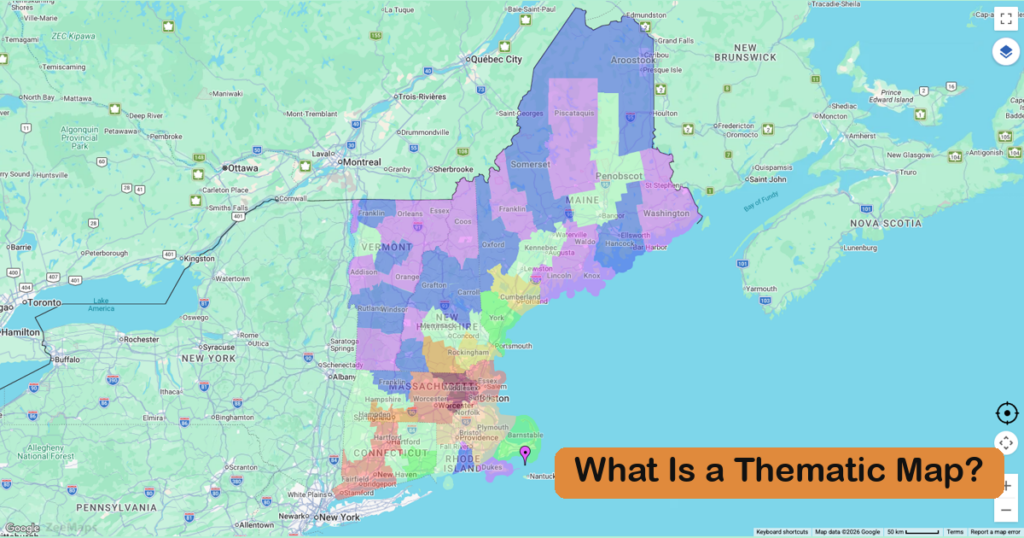
A thematic map is a map that shows how a single subject, or theme, varies across a geographic area. Instead of showing roads, towns, and borders for their own sake, a thematic map uses colors, symbols, or shapes to display a dataset such as population density, average income, rainfall, or election results, so the geographic pattern in the data is visible at a glance.
Thematic maps are used in business, government, journalism, public health, education, and science to analyze one subject and turn a spreadsheet into a story. This guide covers the thematic map definition, how these maps differ from reference maps, the seven most common types of thematic maps with live interactive examples, how to choose the right type for your data, and how to make one from your own spreadsheet.
Thematic Map Definition
In cartography, a thematic map is defined as a map designed to show the spatial distribution of one particular theme, or a small set of related themes, rather than general geographic features. The base map (coastlines, rivers, and state or county boundaries) is kept deliberately simple, because it only exists to give the data context.
The theme can be quantitative (numbers such as population, sales, temperature, or votes) or qualitative (categories such as land use, dominant language, or the winning party in each district). Either way, the map answers one question: where does this thing occur, and how does it vary from place to place?
Thematic mapping has a long history. In 1854, physician John Snow mapped cholera deaths in London’s Soho district street by street and traced the outbreak to a single water pump on Broad Street, one of the earliest and most famous examples of a thematic map changing a real-world decision. Today the same idea powers census dashboards, weather forecasts, sales territory planning, and election-night coverage.
Thematic Maps vs. Reference Maps
Most maps fall into one of two families. Reference maps, such as road maps, topographic maps, and political maps, show where things are: cities, borders, highways, elevation. Thematic maps show how one attribute is distributed across those places. A political map of the United States shows the 50 states; a thematic map shows each state’s population density, median income, or electoral votes.
| Reference map | Thematic map | |
| Purpose | Locate and navigate | Show a pattern in data |
| What stands out | Places and features | One theme: a number or a category per place |
| Base map | Detailed | Simplified, so the data is the focus |
| Examples | Road atlas, topographic map, political map | Population density map, election results map, sales heat map |
7 Types of Thematic Maps
Cartographers group thematic maps by the visual technique used to encode the data. These are the seven types you will meet most often, with what each is best used for, its trade-offs, and an interactive example where we have one.
1. Choropleth Maps
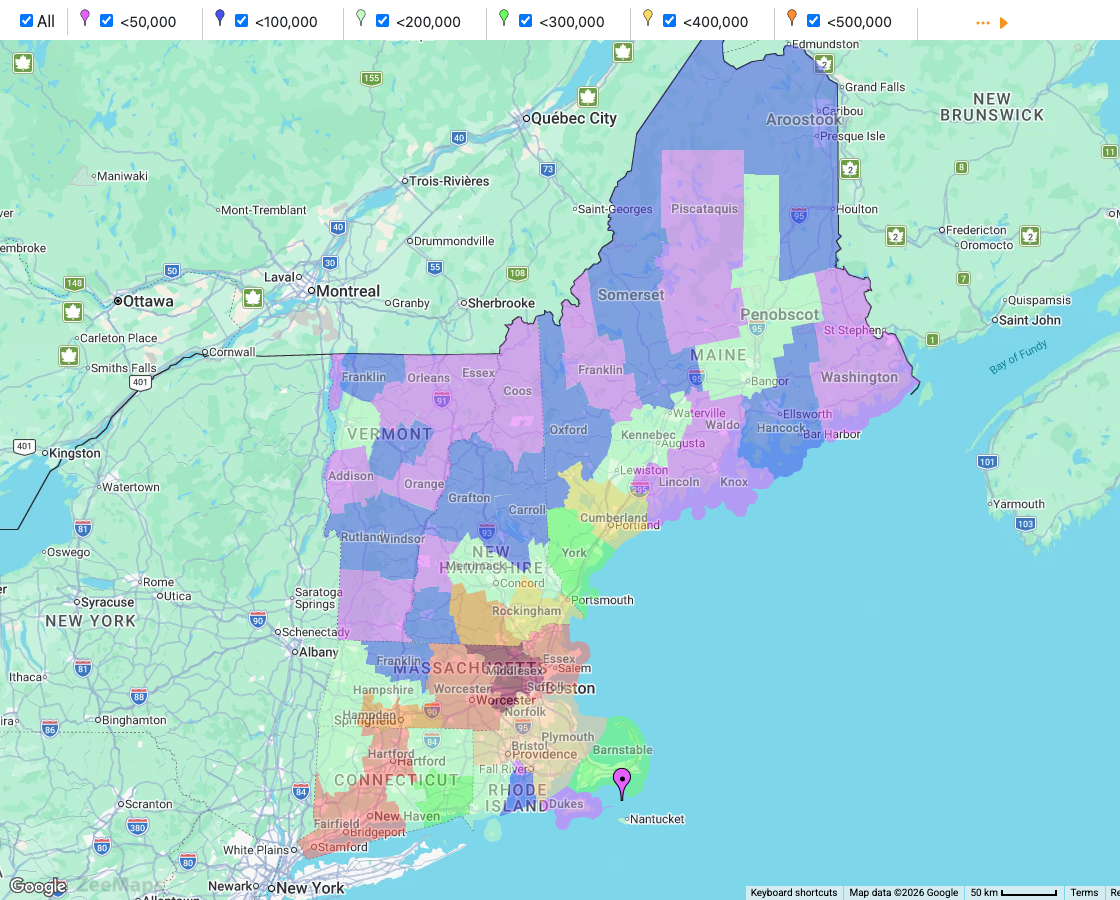
The most common type of thematic map is the choropleth map. You have seen them many times: each region (a country, state, county, or ZIP code) is shaded according to the value of a variable, and a legend ties each color to a range of values.
Choropleth maps use color shading to differentiate between zones on a map, with each color representing a distinct value range. For example, a choropleth map of household income by county lets a business see at a glance which counties have the most people in the income bracket it is targeting. Election results, population density, unemployment rates, and vaccination rates are all classic choropleth subjects.
One rule matters more than any other: map rates, not raw counts. Coloring counties by total population mostly shows which counties are largest; coloring them by population per square mile shows where people actually live densely.
Best used for:
- Demographic information (income, education level, average age, etc.)
- Sales volume within a specific region
- Population information (election results, population density, etc.)
| Advantages | Disadvantages |
| Highly intuitive and easy to synthesize within minutes | Data must be normalized or put on a rate scale so it isn’t misleading |
| Easy to highlight trends and quickly compare data with little to no training | Data aggregation can lead to potential distortion in interpretation |
| Instantly recognizable tool that facilitates effective communication | Lack of context may result in incorrect or biased conclusions |
This interactive map shows the population of each county in the six states of New England, USA. Each color represents a different numerical range. Click a category in the legend to show or hide it.
2. Heat Maps
Heat maps, also known as density maps, depict data with colors or shades to signify levels of intensity or density within a specific region. They use color gradients to show the concentration of values, with warmer colors indicating higher densities or intensities and cooler colors representing lower ones.
Heat maps help identify patterns, trends, and areas of interest by visually highlighting where data points are clustered or distributed. Unlike a choropleth, a heat map ignores administrative boundaries, which makes it the better choice when your data is a list of individual locations rather than a value per region.
These thematic maps are commonly used in fields like sales, data analysis, government, and business. You can use heat maps to represent population density, crime rates, sales trends, market penetration, or any data that requires showcasing concentrations or variations across an area.
Best used for:
- Marketing (identify new markets to enter, map market penetration)
- Sales (unlock new opportunities for growth)
- Population density
| Advantages | Disadvantages |
| Easily identify new opportunities within business, sales, and marketing | Not effective for visualizing data with low variance |
| User-friendly, highly intuitive, and easy to read | Improper scaling could lead to inaccurate reading of the map |
| Quick and visually clear insights lead to effective decision-making | Color variations can be subtle, making slight variations in data hard to distinguish |
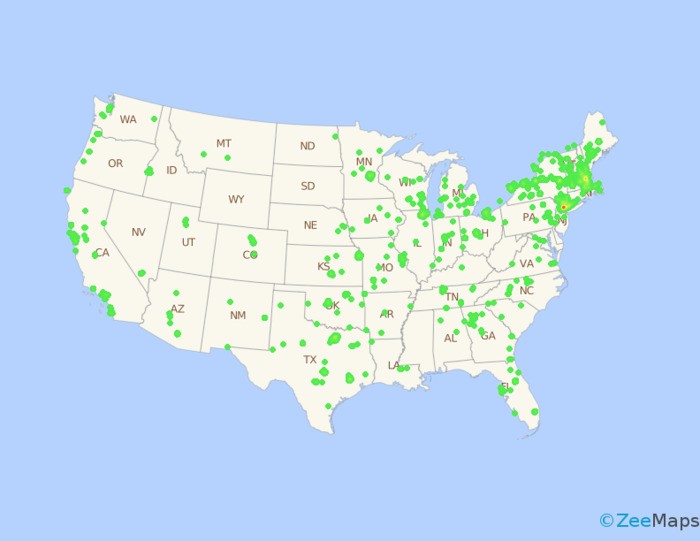
This heat map shows the locations of all the used computer stores in the U.S. You can see from the map that Boston and New York are the most densely populated with stores.
3. Dot Density Maps
Dot density (or dot distribution) maps use dots or other markers to represent the number of times a specific event or phenomenon occurs across a geographic region. Each dot on the map represents a fixed unit of quantity.
For example, one dot could represent 1,000 registered voters. If there are 10,000 registered voters in a region, there would be ten dots concentrated in a small area. Areas with lots of dots signify high numbers of voters, whereas areas with few dots could be good spots for campaigners to focus on, especially if a population map shows that more people than voters live there.
This type of map is suitable for visualizing quantifiable data points, such as the locations of natural disasters, customer hotspots for sales representatives, or the number of stores in a region.
Best used for:
- Geographically dispersed data (a large pool of data within a country or large region)
- Binary data (for example, voter or non-voter)
| Advantages | Disadvantages |
| Represent huge data sets in a simple, easy to understand format | Not great for data with a lot of variance |
| User-friendly, highly intuitive, and easy to read | Needs a relatively large data set to be useful |
| Great to use along with other mapping techniques for better insights | Not the best format for displaying information with a lot of nuance |
4. Proportional Symbol Maps
Proportional or graduated symbol maps use symbols or shapes of corresponding sizes to illustrate the quantity or magnitude of a specific variable. By using different-sized circles, squares, or other shapes, these maps offer a quick visual comparison of the data across regions.
A small circle means a low value, while a large circle indicates a high one. If the variable is the number of people in a region with incomes above $80,000 per year, large circles mark areas with many such households and small circles mark areas with few. Because the symbol sits at a point, this type works well for raw counts that would mislead on a choropleth.
Proportional symbol maps are ideal for representing quantitative information like population, sales figures, or any demographic data.
Best used for:
- Demographic data (income, population, gender)
- Sales figures
- Political and governmental analysis of voter opinions
| Advantages | Disadvantages |
| A simpler representation of data that reduces distraction on the map | Smaller differences in size variation may be harder for viewers to perceive |
| Easily highlight magnitude, which has an impact in storytelling | In highly dense areas, symbols may overlap and become hard to read |
| Clear and highly visual, making it user-friendly | Not the best for highly complex and nuanced data |
This proportional symbol map shows another way to look at the population of each county in New England, USA. The larger circles represent more populous counties, while smaller circles are less populous.
5. Isarithmic (Contour) Maps
Isarithmic maps, also called contour or isoline maps, draw lines that connect points of equal value. Elevation contours on a topographic map, isobars of equal air pressure on a weather map, isotherms of equal temperature, and isochrones of equal travel time are all isarithmic thematic maps. The areas between lines are often shaded, which turns the map into a smooth surface rather than a patchwork of regions.
This type is the right choice when the theme is continuous, meaning it has a value everywhere rather than one value per region. A drive-time map is a familiar business example: shaded bands show everywhere a customer can reach a store within 10, 20, or 30 minutes.
Best used for:
- Weather and climate data (temperature, pressure, rainfall)
- Elevation and terrain
- Travel-time and service-area analysis
| Advantages | Disadvantages |
| Shows gradual change across space naturally | Needs measurements at many points, or interpolation between them |
| Works for any continuous measurement | Lines can imply more precision than the data supports |
| Shaded bands are easy to read without a detailed legend | Not suitable for data that only exists per region, such as tax rates |
6. Flow Maps
Flow maps use lines or arrows to show movement between places: migration, trade, commuting, shipping routes, or air traffic. The width of each line is proportional to the volume moving along it, so the biggest flows dominate the map. The best-known example is Charles Minard’s 1869 chart of Napoleon’s 1812 campaign in Russia, where the thinning line of the army’s retreat tells the whole story.
Flow maps are valuable whenever the theme is a relationship between an origin and a destination rather than a value at a single location.
Best used for:
- Migration and commuting patterns
- Supply chains, shipping, and trade
- Website or app traffic between regions
| Advantages | Disadvantages |
| The only thematic map type that shows direction as well as quantity | Many overlapping flows quickly become a tangle |
| Line width makes the largest flows obvious instantly | Requires origin-destination data, which is harder to collect |
| Combines well with a choropleth base layer | Long flows can hide short, local ones |
7. Cartogram Maps
Cartogram maps are a unique type of thematic map that distorts the geographic shapes and sizes of regions to represent a variable, such as population, GDP, or electoral votes. By resizing and reshaping regions based on the chosen variable, cartograms provide a compelling representation of data that can have a big impact on viewers.
The intentional distortion of geographic size lets viewers see spatial patterns and relationships that are hidden on a conventional map, where large but sparsely populated regions dominate. For example, a map of the world could resize countries by annual GDP, with wealthier countries appearing larger than they are in reality.
Cartograms are ideal for variables that are best understood in relation to the size or population of a region. They provide a unique perspective on spatial patterns and allow for effective comparisons across different areas.
Best used for:
- Population data
- Economic indicators (GDP, income, etc.)
- Election results and electoral votes
- Health and environmental statistics
| Advantages | Disadvantages |
| Visually engaging and memorable design | Unique style of the map can lead to confusion |
| Easy to identify disparities and put them into context | Not the best for nuanced data that can’t be explained with a single variable |
| High-impact maps tell a story and emphasize the importance of the data | Designer must be careful to maintain the integrity of the data without overly distorting it |
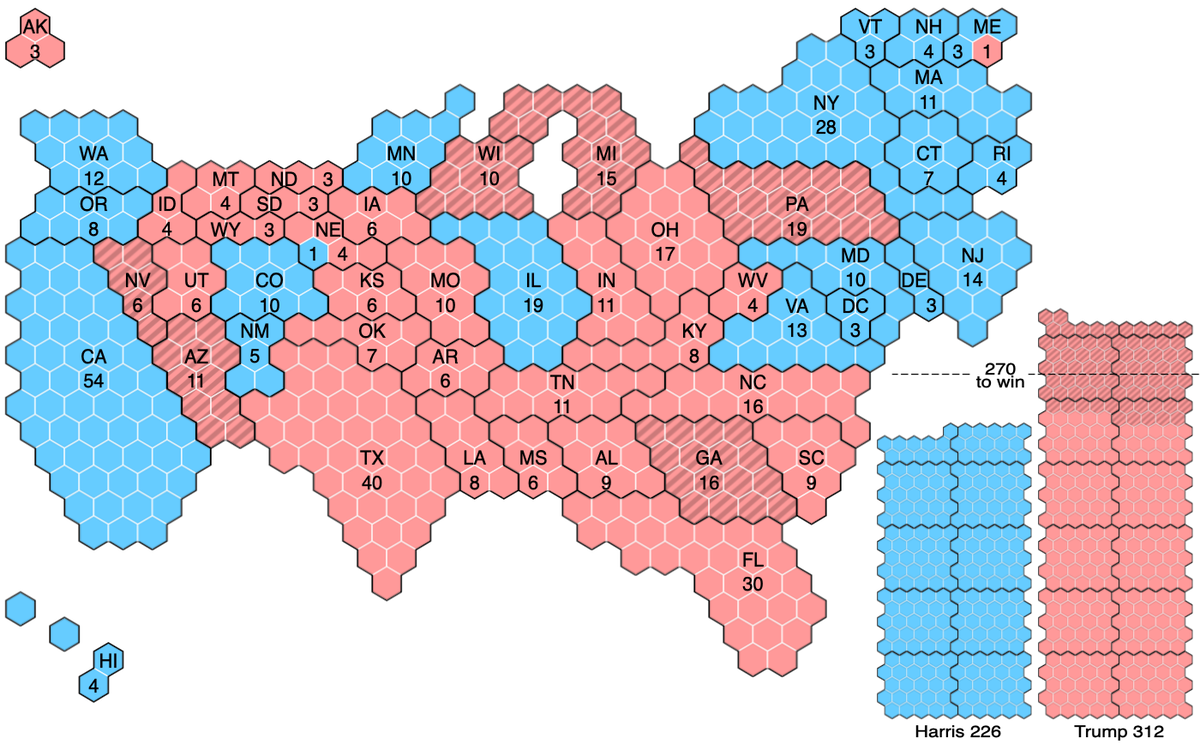
This hexagonal cartogram shows the 2024 U.S. presidential election. Each state is drawn with one hexagon per electoral vote, so Texas (40) and California (54) dominate while Wyoming (3) and Montana (4) shrink to a few cells; hatched cells changed party from 2020. Source: Cmglee, Wikimedia Commons, CC BY-SA 4.0.

You may also run into dasymetric maps (a choropleth refined with extra information, such as leaving uninhabited land unshaded), bivariate choropleth maps (two variables blended into one color scheme), and cluster maps that group nearby points into a single marker. See our guide to cluster maps for the last one.
Thematic Map Examples
Thematic maps are everywhere once you know what to look for. A few examples, with interactive versions you can explore:
- Election maps. The classic red-and-blue map is a qualitative choropleth with one category, the winning party, per state. Our electoral college map adds the number of votes each state carries.
- Census and demographic maps. Population, age, income, and housing data shaded by state, county, or ZIP code, like the New England county map above. Region maps such as the Texas county map and the California ZIP code map are the starting point for this kind of thematic map.
- Weather maps. Isobars, isotherms, and shaded temperature bands are isarithmic thematic maps you see every day.
- Public health maps. Disease incidence by county, vaccination rates, and hospital drive-time coverage all descend directly from John Snow’s cholera map.
- Business maps. Sales by territory, customer density heat maps, market penetration by ZIP code, and store coverage areas.
- Fun maps. A thematic map does not have to be serious: the most popular Christmas cookie by state is a perfectly good qualitative choropleth.
How to Choose the Right Type of Thematic Map
Match the map type to the shape of your data, not the other way around. This table covers the most common cases.
| Your data | Best thematic map type |
| A rate, ratio, or average per region (income per capita, unemployment rate) | Choropleth |
| A raw count per region (population, number of stores) | Proportional symbol, or dot density |
| Many individual locations (customers, incidents, listings) | Dot density, or a heat map for concentration |
| A value that exists everywhere (temperature, elevation, travel time) | Isarithmic |
| Movement from one place to another (migration, shipments) | Flow map |
| Regions compared by weight rather than land area (electoral votes, GDP) | Cartogram |
| One category per region (winning party, dominant industry) | Qualitative choropleth |
Two more rules of thumb: normalize choropleth data (per capita, per square mile, or as a percentage) so large regions do not look important just because they are big, and keep the number of classes small, usually five to seven, so the legend stays readable.
How to Make a Thematic Map
You do not need GIS software to make a thematic map. With ZeeMaps you can build one from a spreadsheet in a few minutes:
- Prepare your data. One row per location or region, with a column for the place (an address, ZIP code, county, state, or country) and a column for the value or category you want to show.
- Upload the spreadsheet. ZeeMaps accepts Excel, CSV, and Google Sheets, and geocodes addresses automatically.
- Color by value for a choropleth. In the Choropleth tab of the import dialog, turn on Color pins and regions by data value, then choose the value column, a color scheme, the number of classes (5 or 7), and whether classes are quantiles or equal intervals. For ZIP codes, counties, and states you can also pick built-in U.S. Census fields such as population and median income instead of supplying your own numbers. See data-driven colors for pins and regions for details.
- Or color by category. Give each category its own marker color and ZeeMaps builds a clickable legend, with up to 75 groups and sub-groups, so viewers can toggle categories on and off.
- Add density or distance layers. Switch on the heat map view to show concentration, or add drive-time areas and radius circles around key locations.
- Publish. Share the interactive map by link, embed it on your website as we have done on this page, or export a map image for a report or slide.
The choropleth, heat map, and proportional symbol maps on this page were all made this way, from a county population spreadsheet and a list of store addresses.
Frequently Asked Questions About Thematic Maps
A thematic map’s purpose is to show the geographic pattern of a single subject, such as population, income, rainfall, or votes, so that differences between places can be seen immediately. Reference maps help you find places; thematic maps help you understand them.
The five types most often taught are choropleth maps, proportional symbol maps, dot density maps, isarithmic (contour) maps, and cartograms. Heat maps and flow maps are also widely used, which is why this guide covers seven types of thematic maps.
A reference map shows where things are: roads, cities, borders, and terrain. A thematic map shows how one attribute, such as population density or election results, varies across those places. The base map in a thematic map is simplified so the data stands out.
The choropleth map, which shades each region by a data value, is the most common thematic map. It is the format used for most election, census, and economic maps.
Yes. A weather map that draws isobars (lines of equal pressure), isotherms (lines of equal temperature), or shaded temperature bands is an isarithmic thematic map, and a map of storm warnings by county is a choropleth.
Yes. A cartogram is a thematic map that resizes regions in proportion to a variable such as population or electoral votes instead of land area, which is why it looks distorted compared with a reference map.
A cartogram. It draws each region at a size proportional to a chosen variable, such as population, GDP, or electoral votes, rather than its actual land area.
A map of the United States with each state colored by the party that won the 2024 presidential election is a thematic map. So is a map of county population density, a sales heat map, or John Snow’s 1854 map of cholera deaths in London.
Inspired by this map?
Create your own interactive map with ZeeMaps in minutes.