
Maps are most useful when they are current. But if your locations live in a CRM, a database, or an internal tool, keeping a map up to date by hand quickly becomes a chore. What if an AI map generator could keep it fresh for you — working from your real data?
With the new ZeeMaps REST API, your software can do the work for you. Create maps, add and update markers, search locations, and render map images — all from your own code, scripts, or scheduled jobs.
Complete developer documentation, including a ten-minute quickstart, is available at apidocs.zeemaps.com.
Let Your AI Assistant Be Your Map Generator
Here is the part that changes the game: you don’t have to write a line of code yourself. AI assistants like ChatGPT and Claude are very good at writing programs against a documented REST API — paired with ZeeMaps, they become an AI map generator for real data. Describe the map you want in plain English, and let your assistant do the rest.
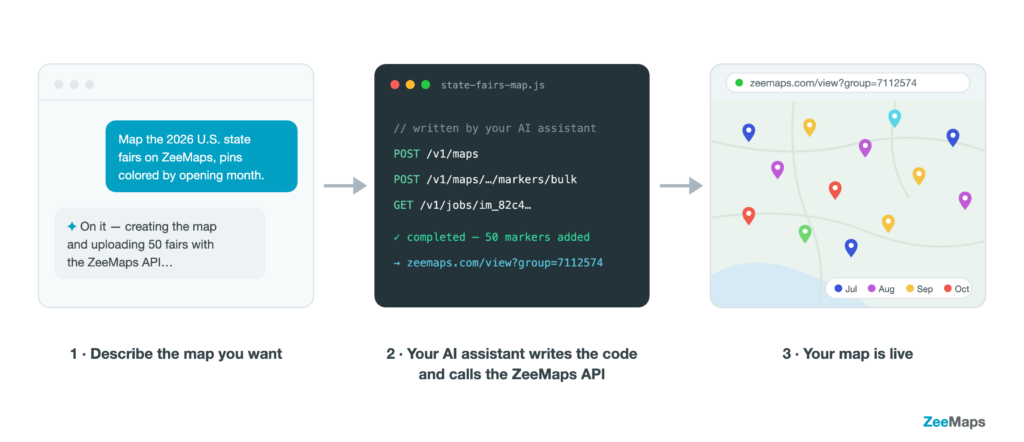
That is exactly how we built our State Fairs Map of 2026 — no code written by hand, just a short conversation in the ChatGPT app in a browser:
“Create an interactive map of all the 2026 U.S. state fairs on ZeeMaps. Include each fair’s dates, location, and official website, and color the pins by opening month. The API documentation is at apidocs.zeemaps.com.”
ChatGPT took it from there. It:
- Researched the fairs and gathered names, cities, states, dates, and official websites into a spreadsheet.
- Wrote a small Node.js script that calls the ZeeMaps API: it checks the API key, creates the map, makes it public, bulk-uploads the spreadsheet, and waits for the import job to finish.
- Handed the script back with instructions: add your API key and run it.
One command later, the script printed a link to the finished map, along with an iframe snippet for embedding it in a website. Here is the result: U.S. State Fairs 2026 — every fair pinned, with dates and websites in the popups, colored by opening month.
And when the data changes — a fair announces new dates, or you decide to add county fairs too — you don’t edit the map by hand. Ask your assistant to update the spreadsheet and run the script again.
Two tips for good results: give your assistant the link to the API documentation, and keep your API key out of the chat — have the script read it from a local file, so the assistant never sees it.
What Is the ZeeMaps API?
The ZeeMaps API is a standard REST interface: your program makes HTTPS requests to https://api.zeemaps.com/v1, sends and receives JSON, and authenticates with an API key. If your team has ever integrated with a payment provider or a CRM, this will feel immediately familiar. It is also the same interface an AI map generator drives behind the scenes.
Anything you create or change through the API behaves like any other ZeeMaps map. You can view it in your browser, share it with viewers, members, and admins, embed it in your website, or turn it into an image — the API and the ZeeMaps you already know work on the same maps.
What You Can Do
Manage maps
Create, update, clone, archive, and delete maps. Share a map with viewers, members, or admins, and transfer ownership — everything you need to manage a whole fleet of maps programmatically.
Add and update markers
Add markers one at a time, or thousands at once with the bulk endpoints. Send coordinates if you have them, or just an address — ZeeMaps geocodes it for you. And markers are not limited to pins: you can also add region markers (ZIP codes, counties, states) and circles.
Search your data
Search markers by text, category, or field values, and find the pins nearest to a location across all of your maps — handy for “closest store” lookups and dispatch decisions.
Generate map images
Request a high-resolution image of a map for reports, brochures, or dashboards. Rendering runs as a background job that your program can poll until the image is ready.
Legends, fields, and demographics
Read and update a map’s legend, list its custom fields and available colors, and discover the built-in U.S. Census demographic fields you can use with region maps.
Generate a Map in Two Calls
Prefer to write the code yourself? Here is a map created and populated from scratch. First, create the map:
curl -X POST https://api.zeemaps.com/v1/maps
  -H "Authorization: Bearer $ZM_KEY"
  -H "Content-Type: application/json"
  -d '{ "name": "Store Locations" }'
Then add a marker. No coordinates needed — send an address and ZeeMaps geocodes it:
curl -X POST https://api.zeemaps.com/v1/maps/4322001/markers
  -H "Authorization: Bearer $ZM_KEY"
  -H "Content-Type: application/json"
  -d '{
        "name": "Downtown Store",
        "address": { "street": "350 Mission St", "city": "San Francisco",
                     "state": "CA", "zip": "94105" },
        "category": "Store"
      }'
That’s it. The marker is geocoded, colored by its category, and live on your map. The quickstart guide walks through the whole flow, with a copy-pasteable command for every step — these are the same calls an AI map generator runs on your behalf.
What Maps Will You Generate?
The API shines wherever map data changes faster than anyone wants to re-import a spreadsheet:
- An AI map generator on demand — ask your assistant for a new map whenever the need comes up; the API does the heavy lifting.
- A store locator that updates itself — a nightly job pushes openings, closures, and moves from your database straight to the map embedded in your website.
- Your CRM on a map — plot customers, prospects, or accounts as they are added or updated, colored by status or owner.
- Field operations — publish each morning’s jobs, deliveries, or crew assignments to a map your team checks on their phones.
- Territory and coverage views — shade ZIP codes, counties, or states from live numbers.
- Automated reporting — render a fresh map image for the weekly deck, without opening a browser.
Getting Access
The API is available on the Enterprise plan.
- Upgrade your account to an Enterprise subscription (see pricing).
- Contact us to request an API key. Your key is shown once — store it like a password.
- Follow the quickstart: from a fresh key to your first markers in under ten minutes.
Requests are rate-limited per key, and every error response says exactly what went wrong and links to the documentation page that fixes it.
Related articles:
- Map Images with ZeeMaps
- Add U.S. Census Demographics to Your Maps
- Graduated, Data-Driven Colors for Your Pins and Regions
Final Thoughts
Your maps no longer need manual upkeep. Connect them to the systems where your location data already lives — or hand the job to an AI map generator — and they stay current on their own.
Head over to apidocs.zeemaps.com, grab the quickstart, and put your first marker on a map from code today.