
Managing annotations in ZeeMaps just received a major upgrade. We’ve introduced a modern annotation editor that makes it easier than ever to add descriptive text, labels, legends, and visual notes directly onto your maps.
Whether you use annotations for storytelling, planning, presentations, or collaboration, this new editor gives you far more flexibility and creative control.
Use the menu Additions -> Annotate Map to add an annotation. Click on the location that you want to place the annotation. You can change it later by moving the annotation. Use the editor to add your annotation. Once added, you can drag-and-drop the annotation to a new location. Also, if you click on the annotation the editor will show again so you can make changes to it.
Sales Regions Map Annotations
A common example of using annotations on maps is dividing up sales areas into several regions that can be managed semi-autonomously. For example, below is a map of the US divided into three regions: Western Region, Central Region and Eastern Region.
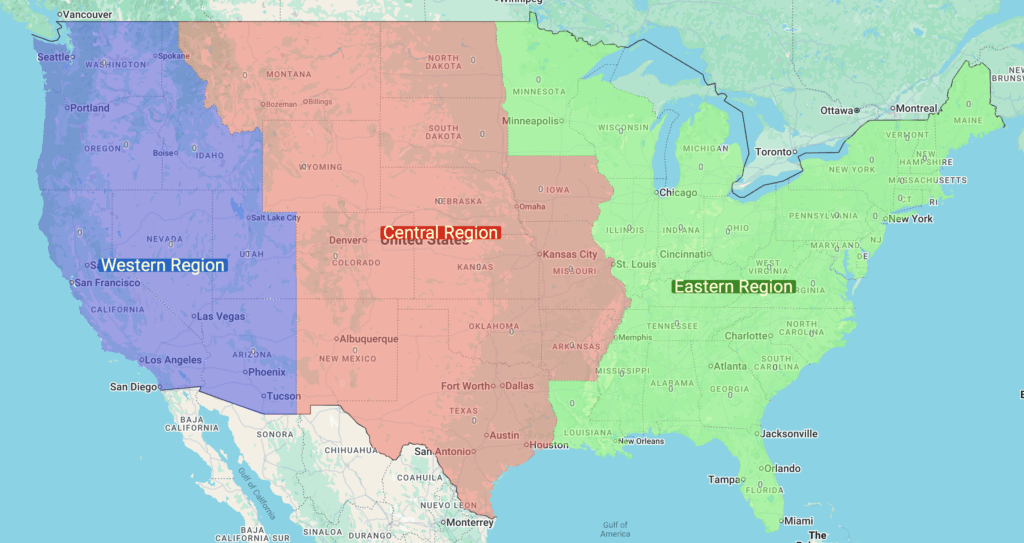
While it is easy to highlight the regions by uploading a spreadsheet with columns state and color, we cannot directly use the “region labels” to annotate the map. The region labels work on individual states, and they will repeat if we labeled each state. That is why the upgraded annotations help in making the map visually informative.
What’s New: A Modern, Rich-Text Map Annotations Editor
ZeeMaps now includes a fully integrated WYSIWYG editor powered by Quill, replacing the previous plain-text input box. This allows you to create map annotations using rich HTML formatting, including:
Text formatting
- Bold
- Italic
- Underline
- Bulleted and numbered lists
- Text alignment options
Better layout control
- Multiple paragraphs
- Clean, structured formatting
- Automatic line breaks
Hyperlinks
You can add clickable links directly inside annotations to reference external resources, documents, or related pages.
Background highlighting
Highlight important text or emphasize specific parts of your annotation.
Safe, sanitized HTML
All annotation content is automatically cleaned with DOMPurify, ensuring security while maintaining rich formatting capabilities.
Cleaner, More Readable Map Annotations
Annotations now support structured HTML, allowing them to display more cleanly and consistently on the map.
We’ve also improved the annotation renderer:
- Background-highlighted text now includes appropriate spacing and padding.
- Multi-line annotations are easier to read.
- The annotation box automatically adapts to your formatting.
This makes your map annotations clearer and more visually coherent—especially useful for labels, legends, descriptions, and callouts.
Improved Editing Workflow
Editing existing annotations is now smoother:
- Clicking an annotation opens the new editor with your formatting fully preserved.
- You can adjust text, paragraphs, links, and layout instantly.
- All changes retain the original structure.
- Admin users can continue to drag and reposition annotations directly on the map.
This creates an experience that feels more like editing a document than working inside a basic text box.
Backward Compatible With Existing Maps
Annotations created with the older system continue to work seamlessly.
ZeeMaps automatically detects whether an annotation uses:
- Legacy formatting (simple color + size), or
- The new HTML-based formatting from the Quill editor.
Older annotations continue to display exactly as before, and you can upgrade them whenever you’re ready.
Why This Matters
Map annotations are a powerful way to communicate context and insight.
Whether your maps are used for business operations, analysis, education, logistics, or presentations, clear and expressive annotations help you:
- Explain meaning
- Highlight important locations
- Improve storytelling
- Create more informative dashboards
- Present data with better clarity
The new editor makes creating high-quality annotations faster and more visually consistent.
Coming Soon
We plan to continue improving the annotation experience with features such as:
- Optional borders and backgrounds for annotation boxes
- Pinned (viewport-fixed) annotations for legends and map titles
- Additional formatting tools
- Inline editing inside data tables
- More layout and styling options
If you have requests or suggestions, we welcome your feedback.
Try the New Map Annotations Editor Today
The new annotation editor is available now for all ZeeMaps users.
Create a map, add an annotation, and enjoy a cleaner, more powerful editing workflow that gives your maps the clarity and polish they deserve.